
ADR (Freddie Mac)
Verified against source (5)
quandis.com/freddiemacadr-integrationguide_htmlImport/Import.ashx.csimport/ImportFile.csLogging/ImportLog.ImportResult.xsltConfig/CustomRoutes.config
This view is for law firm IT teams and case management system (CMS) vendors who send referrals, case updates, step completions, holds, messages and documents to Freddie Mac’s Attorney Data Reporting system (ADR) automatically. Every call is an HTTPS POST of an XML document, and every call returns an XML import result you can also find later in the ADR web interface.
For what ADR does and who uses it, see the ADR overview. For working cases in the web interface, see the end-user view (Attorney User Guide). For configuration, see the power-user view.
| Term | Meaning |
|---|---|
| Process (process record) | A case in ADR: a Foreclosure, an MFR (motion for relief) or a POC (proof of claim). MFR and POC are both Bankruptcy processes. |
| ImportForm | A tracked step on a process (called a task or step in other systems; a milestone in Freddie Mac’s earlier DCS system). |
| DecisionDelay | A hold or delay on a process. |
| Message | A note or memo on a process. |
| Ledger | Accounting figures on a process (Total Debt for Foreclosures, Pre and Post Petition Arrearages for Bankruptcy). |
| SubscriberID | Your globally unique identifier for a process, used to find it again on later submissions. |
| Autobind | Finding a process by Freddie Mac loan number and your Attorney Case ID instead of a SubscriberID. |
| ADR certification | The test pass every integrator completes before sending data to production. See Certification checklist. |
Connectivity and security
Section titled “Connectivity and security”ADR accepts data over the public internet by HTTPS (2048-bit certificates). VPN connectivity is available in special circumstances. The interface is REST: one URL per operation.
Authentication
Section titled “Authentication”ADR uses HTTP Basic authentication. Quandis issues separate credentials for each environment; send them on every call.
| Header | Requirement |
|---|---|
Authorization |
Basic followed by the base64 of username:password, using the credentials for the environment you are calling. |
User-Agent or SOAPAction |
Either omit User-Agent entirely, or send a SOAPAction header with any non-empty value. Either one tells ADR the call is automated, so it answers with a Basic authentication challenge instead of redirecting to the sign-in page. |
Most HTTP libraries add a User-Agent by default, so sending SOAPAction is usually the simpler choice.
You don’t identify your firm in the XML. ADR assigns your firm to new cases from the credentials that submitted them.
Environments
Section titled “Environments”| Environment | Purpose | Host |
|---|---|---|
| DEV | Initial connectivity and integration tests | devadr.quandis.net |
| UAT | System integration testing and certification | uatadr.quandis.net |
| PROD | Production | www.freddiemacadr.com |
The older hosts integrationadr.quandis.net (UAT) and integration.freddiemacadr.com (PROD) were retired in 2018.
Submission URLs
Section titled “Submission URLs”Each operation has its own URL:
POST https://{host}/api/import/{operation}| URL | Calls |
|---|---|
https://devadr.quandis.net/api/import/foreclosure |
Foreclosure, in DEV |
https://uatadr.quandis.net/api/import/importform |
ImportForm, in UAT |
https://www.freddiemacadr.com/api/import/mfr |
MFR, in PROD |
The operation is the name of an ADR import template (the list is in Operations). An unknown name fails with Unrecognized Template. All operations are POST except Result, which is GET.
The request body is the XML document itself. ADR reads the raw body, so no form encoding is needed.
POST https://uatadr.quandis.net/api/import/foreclosureupdateAuthorization: Basic {base64 of username:password}SOAPAction: adr-importContent-Type: text/xml; charset=utf-8
<ImportCollection Reference="JOB-0001">  <ForeclosureItem>    …  </ForeclosureItem></ImportCollection>
Submit data
Section titled “Submit data”Checklist
Section titled “Checklist”Every submission needs:
- The authentication headers for the environment.
- The URL for the operation.
- HTTP method
POST. - An XML body that matches the operation’s schema, with elements in the order shown in the operation’s table. ADR validates against the schema, and out-of-order elements fail validation.
Processing flow
Section titled “Processing flow”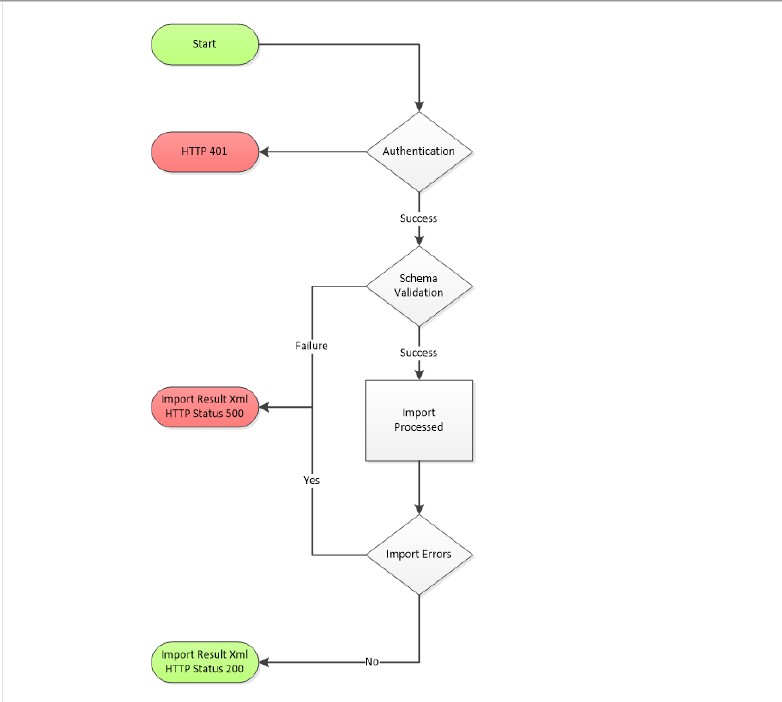
HTTP status
Section titled “HTTP status”| Status | Meaning |
|---|---|
200 |
Success. Read the import result XML for per-record detail. |
401 |
Sign-in failed. Check the credentials, and check that they belong to the environment you’re calling. |
500 |
One or more failures, including schema validation failures. The import result XML has the detail. |
Treat any status other than 200 as a problem with the submission.
Import result XML
Section titled “Import result XML”Every call returns an import result, whether it succeeded or not. The root element summarizes the import; each Result child reports one record.
<ImportResults ID="3460049" SuccessCount="1" WarningCount="0" ErrorCount="1" Status="Complete" ImportStart="2026-01-15T10:26:00" ImportComplete="2026-01-15T10:26:02" Reference="JOB-0001"> <Result ID="88200101"> <Object>Contact</Object> <ObjectID>5200001</ObjectID> <Operation>Insert</Operation> <Status>Success</Status> <Properties> <LastName>Doe</LastName> <FirstName>Jane</FirstName> <USSSN>xxx-xx-0001</USSSN> </Properties> </Result> <Result ID="88200102" Reference="FC-0001"> <Object>Foreclosure</Object> <Operation>Insert</Operation> <Status>Error</Status> <Message>Rule Exception: Start Date must be specified when creating a case</Message> </Result></ImportResults>ImportResults (attributes)
| Attribute | Always present | Type | Meaning |
|---|---|---|---|
ID |
Y | Integer | The ImportFileID. Searchable in ADR. |
SuccessCount |
Y | Integer | Records inserted or updated. |
WarningCount |
Y | Integer | Records with warnings. |
ErrorCount |
Y | Integer | Records that failed. |
Status |
Y | Enumerated | Complete, Error or Validation Error. |
ImportStart |
Y | Date | When the import started. |
ImportComplete |
Y | Date | When the import finished. |
Reference |
N | Text | The Reference you sent on ImportCollection. Searchable in ADR. |
Result (one per record touched)
| Item | Always present | Type | Meaning |
|---|---|---|---|
ID (attribute) |
Y | Integer | The ImportLogID. Searchable in ADR. |
Reference (attribute) |
N | Text | The Reference you sent on the item. Searchable in ADR. |
Object |
Y | Text | The object affected (for example Foreclosure, Contact). |
ObjectID |
N | Integer | ADR’s ID for that object. |
Operation |
Y | Text | What was done to the object (for example Insert). |
Status |
Y | Text | Success or Error (Warning is also possible). |
Message |
When Status is Error or Warning |
Text | Why the record failed. |
Properties |
Successful records only | Node | The record’s saved properties. Omitted when the item carried a Reference. Social Security numbers are masked to the last four digits. |
Retrieve a result later
Section titled “Retrieve a result later”The Result operation returns the import result for an earlier submission. Call it with GET and the ImportFileID from the ID attribute of ImportResults:
GET https://{host}/api/import/result?ID={ImportFileID}Authorization: Basic {base64 of username:password}SOAPAction: adr-importThe same XML is available from the Import dashboard.
Operations
Section titled “Operations”| Operation | What it does | Stand-alone | Schema |
|---|---|---|---|
Foreclosure |
Creates a Foreclosure referral. | No | Foreclosure.xsd |
ForeclosureUpdate |
Updates a Foreclosure: status, sale and financial information, delays, steps, messages and documents. | No | Foreclosure.Update.xsd |
POC |
Creates a POC referral. | No | POC.xsd |
POCUpdate |
Updates a POC, with the same scope as ForeclosureUpdate. | No | POC.Update.xsd |
MFR |
Creates an MFR referral. | No | MFR.xsd |
MFRUpdate |
Updates an MFR, with the same scope as ForeclosureUpdate. | No | MFR.Update.xsd |
Message |
Adds a message to an existing Foreclosure, POC or MFR. | Yes | Message.xsd |
Document |
Adds a document to an existing Foreclosure, POC or MFR. | Yes | Document.xsd |
ImportForm |
Projects or completes a step on an existing Foreclosure, POC or MFR. | Yes | ImportForm.xsd |
Result |
Returns the import result of an earlier submission (GET). |
n/a | n/a |
Stand-alone operations send an object on its own, pointing at its process with Object and ObjectSubscriberID. The others send a process, with any child objects nested inside it.
ADR does not accept Eviction or Closing referrals. Freddie Mac chose not to track them in ADR.
| Operation | Path |
|---|---|
| Foreclosure | POST /api/import/foreclosure |
| ForeclosureUpdate | POST /api/import/foreclosureupdate |
| POC | POST /api/import/poc |
| POCUpdate | POST /api/import/pocupdate |
| MFR | POST /api/import/mfr |
| MFRUpdate | POST /api/import/mfrupdate |
| Message | POST /api/import/message |
| Document | POST /api/import/document |
| ImportForm | POST /api/import/importform |
| Result | GET /api/import/result?ID={ImportFileID} |
Data binding
Section titled “Data binding”Data binding is how ADR finds an existing process when you send more data about it. You need it to:
- update a process (Foreclosure, MFR or POC), and
- save child objects for a process (complete a step, add a delay, post a message or document).
ADR binds by SubscriberID or by Autobind.
SubscriberID
Section titled “SubscriberID”A SubscriberID identifies one process across every submission. It appears in two forms:
- Process SubscriberID: a
SubscriberIDelement inside a process item (ForeclosureItem,MFRItem,POCItem). Everything nested in that item binds to the process. - Object / ObjectSubscriberID: used by stand-alone items.
Objectnames the process type (ForeclosureorBankruptcy) andObjectSubscriberIDholds the process’s SubscriberID, exactly as it was sent on the process.
Build SubscriberIDs with this pattern:
{URL of source}-{table name in source system}-{primary key in source system}| Part | Meaning | Example |
|---|---|---|
| URL of source | Your firm’s website or CMS URL | www.attorney.example |
| Table name | The table the record comes from in your system | Foreclosure |
| Primary key | The record’s identity in your system | 181 |
Full example: www.attorney.example-Foreclosure-181.
Rules:
- SubscriberIDs are globally unique. Send every update for a case with exactly the same SubscriberID. A different value is treated as a different case.
- Never change a SubscriberID. If it changes between submissions, ADR can’t find the existing case (see Troubleshooting).
- A closed case keeps its SubscriberID. A new case on the same loan needs a new SubscriberID.
- Cases converted from DCS kept their SubscriberIDs. Keep using the same pattern to update them.
Autobind
Section titled “Autobind”If you don’t send a SubscriberID, ADR finds the case by Freddie Mac loan number and Attorney Case ID (the Foreclosure, MFR or POC element). If more than one case has that Attorney Case ID, ADR binds to the active case; if none is active, it binds to the most recent case by DateOpened.
Autobind assumes:
- your Attorney Case IDs are unique across every case in your CMS, and
- the Attorney Case ID for each case is the same in your CMS and in ADR. If a case ID changes in your CMS, a user must update it in the ADR web interface (the end-user view explains how).
Autobind works for process updates and for children nested in a process update. It is not supported for stand-alone operations (Message, Document, ImportForm); those need Object and ObjectSubscriberID.
Binding examples
Section titled “Binding examples”1. Update a process by SubscriberID. Common uses are closing a case, recording sale information and changing contacts.
<ImportCollection> <MFRItem> <SubscriberID>www.attorney.example-MFR-1000000</SubscriberID> <Status>Closed</Status> <DateClosed>2026-01-02</DateClosed> <ClosedReason>Paid Off / Reinstated</ClosedReason> </MFRItem></ImportCollection>2. Update a child object nested in a process update, by SubscriberID. The nested ImportForm binds to the process automatically.
<ImportCollection> <MFRItem> <SubscriberID>www.attorney.example-MFR-1000000</SubscriberID> <Forms> <ImportFormItem> <Template>Bankruptcy File Received</Template> <ActualCompletion>2026-01-02</ActualCompletion> <Messages_0_Message>Task Changed</Messages_0_Message> <Messages_0_BodyText>Task changed because of this reason</Messages_0_BodyText> </ImportFormItem> </Forms> </MFRItem></ImportCollection>3. Update a child object stand-alone, by Object and ObjectSubscriberID. Send it to the ImportForm operation.
<ImportCollection> <ImportFormItem> <Object>Bankruptcy</Object> <ObjectSubscriberID>www.attorney.example-MFR-1000000</ObjectSubscriberID> <Template>Bankruptcy File Received</Template> <ActualCompletion>2026-01-02</ActualCompletion> <Messages_0_Message>Task Changed</Messages_0_Message> <Messages_0_BodyText>Task changed because of this reason</Messages_0_BodyText> </ImportFormItem></ImportCollection>4. Update a process by Autobind. The Attorney Case ID identifies the case.
<ImportCollection> <MFRItem> <MFR>MFR-0001</MFR> <Loan> <Agency>Freddie Mac</Agency> <Loan>900000001</Loan> </Loan> <Status>Closed</Status> <DateClosed>2026-01-02</DateClosed> <ClosedReason>MFR Granted</ClosedReason> </MFRItem></ImportCollection>5. Update a child object nested in a process update, by Autobind.
<ImportCollection> <ForeclosureItem> <Foreclosure>FC-0001</Foreclosure> <Loan> <Agency>Freddie Mac</Agency> <Loan>900000001</Loan> </Loan> <Forms> <ImportFormItem> <Template>Foreclosure File Received</Template> <ActualCompletion>2026-01-02</ActualCompletion> <Messages_0_Message>Task Changed</Messages_0_Message> <Messages_0_BodyText>Task changed because of this reason</Messages_0_BodyText> </ImportFormItem> </Forms> </ForeclosureItem></ImportCollection>Reading the data definitions
Section titled “Reading the data definitions”Each operation below has a table of elements, in the order they must appear. Nesting is shown with / (for example Loan/Borrowers/BorrowerItem/LastName).
| Column | Code | Meaning |
|---|---|---|
| Req | Y |
Required |
N |
Not required | |
O |
Optional parent node: if you send it, its own required children apply | |
C |
Conditional: required in the situation described in Notes | |
| Type | Node | A parent element containing other elements |
| Enum | One of a fixed set of values (in Notes or the schema) | |
| Attr | An XML attribute | |
| Text | Text | |
| Date | YYYY-MM-DD, YYYY-MM-DDTHH:MM:SS, YYYY-MM-DDTHH:MM:SS+HH:MM, YYYY-MM-DDTHH:MM:SS-HH:MM or YYYY-MM-DDTHH:MM:SSZ |
|
| Money | A decimal amount | |
| Int | Integer | |
| Max | Maximum length in characters |
Every request’s root element is ImportCollection, which may carry a Reference attribute (your job or batch number, up to 50 characters). The reference comes back on ImportResults and is searchable in ADR.
Foreclosure (new referral)
Section titled “Foreclosure (new referral)”POST /api/import/foreclosure creates a Foreclosure referral.
| Element | Req | Type | Max | Notes |
|---|---|---|---|---|
ImportCollection/@Reference |
N | Attr | 50 | Job number of the submission |
ForeclosureItem |
Y | Node | One per referral | |
ForeclosureItem/@Reference |
N | Attr | 50 | Your unique value for this Foreclosure in your CMS |
SubscriberID |
N | Text | 255 | See SubscriberID |
Loan |
Y | Node | ||
Loan/Agency |
Y | Enum | Always Freddie Mac |
|
Loan/Loan |
Y | Text | 9 | A valid Freddie Mac loan number |
Loan/Property_Address |
N | Text | 100 | |
Loan/Property_City |
N | Text | 50 | |
Loan/Property_PostalCode |
N | Text | 10 | 5 digits or ZIP+4 |
Loan/ServicerLoanID |
Y | Text | 100 | The servicer’s loan number |
Loan/LoanType |
N | Enum | Conventional, FHA, VA, USDA |
|
Loan/OriginalBalance |
Y | Money | Original loan amount | |
Loan/UPBAmount |
Y | Money | Current unpaid principal balance | |
Loan/LienPriorityType |
N | Int | Lien position: 1 or 2 |
|
Loan/PublicRecords |
N | Node | ||
Loan/PublicRecords/PublicRecordItem |
C | Node | Required when PublicRecords is sent |
|
…/PublicRecordItem/PublicRecord |
C | Enum | Required when PublicRecords is sent. Always Mortgage Deed of Trust |
|
…/PublicRecordItem/FilingDate |
N | Date | Date the deed of trust was dated | |
…/PublicRecordItem/RecordingDate |
N | Date | Date the deed of trust was recorded | |
Loan/Borrowers |
Node | |||
Loan/Borrowers/BorrowerItem |
Y | Node | At least one | |
…/BorrowerItem/LastName |
Y | Text | 50 | LastName + FirstName together may not exceed 50 characters |
…/BorrowerItem/FirstName |
Y | Text | 50 | See LastName |
…/BorrowerItem/BorrowerType |
Y | Enum | Primary, Secondary |
|
…/BorrowerItem/USSSN |
N | Text | 11 | |
…/BorrowerItem/Address |
N | Text | 50 | Mailing street address |
…/BorrowerItem/City |
N | Text | 50 | Mailing city |
…/BorrowerItem/State |
N | Text | 2 | Mailing state |
…/BorrowerItem/PostalCode |
N | Text | 10 | Mailing postal code |
…/BorrowerItem/Sequence |
Y | Int | Borrower order. Send the same value for the same borrower on every submission. | |
Foreclosure |
Y | Text | 50 | Your Attorney Case ID |
DateOpened |
Y | Date | ||
Status |
Y | Enum | Open, On Hold, Closed |
|
ProcessType |
O | Enum | Judicial, Non Judicial, Home Equity, Co-op |
|
SaleAmount |
N | Money | ||
SoldToName |
N | Enum | Back to Beneficiary, Third Party, Reverted to Senior, Undisclosed |
|
ScheduledSaleDate |
N | Date | ||
RedemptionDate |
N | Date | ||
DeficiencyStatus |
O | Enum | Waived, Preserved |
|
RedemptionAmount |
N | Money | ||
TotalDebtLedger |
N | Node | See Total Debt ledger | |
Delays |
O | Node | See Delays | |
Forms |
O | Node | See Steps | |
Messages |
O | Node | See Messages | |
Attachments |
O | Node | See Documents | |
OpeningBidAmount |
O | Money |
DateClosed and ClosedReason can’t be sent on a new referral (removed in version 1.6). Close a case with ForeclosureUpdate.
Only the Freddie Mac loan number is strictly needed to identify the loan: Freddie Mac boards property and loan data into ADR daily. Make sure the loan number is right, because the referral binds to the loan by that number when it’s submitted.
<ImportCollection Reference="JOB-0001"> <ForeclosureItem> <SubscriberID>www.attorney.example-Foreclosure-10000053</SubscriberID> <Loan> <Agency>Freddie Mac</Agency> <Loan>900000001</Loan> <Property_Address>100 Example St</Property_Address> <Property_City>Anytown</Property_City> <Property_PostalCode>90000</Property_PostalCode> <ServicerLoanID>SVC-0000001</ServicerLoanID> <LoanType>Conventional</LoanType> <OriginalBalance>155765.33</OriginalBalance> <UPBAmount>135400.44</UPBAmount> <LienPriorityType>1</LienPriorityType> <PublicRecords> <PublicRecordItem> <PublicRecord>Mortgage Deed of Trust</PublicRecord> <FilingDate>2015-07-21</FilingDate> <RecordingDate>2015-07-25</RecordingDate> </PublicRecordItem> </PublicRecords> <Borrowers> <BorrowerItem> <LastName>Doe</LastName> <FirstName>Jane</FirstName> <BorrowerType>Primary</BorrowerType> <USSSN>999-99-0001</USSSN> <Address>123 Maple St</Address> <City>Anytown</City> <State>FL</State> <PostalCode>30000</PostalCode> <Sequence>1</Sequence> </BorrowerItem> <BorrowerItem> <LastName>Doe</LastName> <FirstName>John</FirstName> <BorrowerType>Primary</BorrowerType> <USSSN>999-99-0002</USSSN> <!-- Address, City, State, PostalCode as above --> <Sequence>2</Sequence> </BorrowerItem> </Borrowers> </Loan> <Foreclosure>10000053</Foreclosure> <DateOpened>2026-01-05</DateOpened> <Status>Open</Status> <ProcessType>Non Judicial</ProcessType> <TotalDebtLedger> <Template>Total Debt</Template> <Items> <AccruedLateCharges>15.00</AccruedLateCharges> <PendingAdvances>25</PendingAdvances> <FCFeesCosts> <Items> <ForeclosureFee>15</ForeclosureFee> </Items> </FCFeesCosts> </Items> </TotalDebtLedger> <Forms> <ImportFormItem> <Template>Foreclosure File Received</Template> <ProjectedCompletion>2026-01-06</ProjectedCompletion> <ActualCompletion>2026-01-06</ActualCompletion> <Messages_0_Message>Task Changed</Messages_0_Message> <Messages_0_BodyText>Task changed because of this reason</Messages_0_BodyText> </ImportFormItem> </Forms> <Messages> <MessageItem> <Template>Attorney Message</Template> <Message>This is the subject</Message> <BodyText>Message content goes here</BodyText> </MessageItem> </Messages> <Attachments> <AttachmentItem> <FileName>Referral.pdf</FileName> <Template>FC Document</Template> <Description>Description goes here</Description> <Content><![CDATA[{base64}]]></Content> </AttachmentItem> </Attachments> </ForeclosureItem></ImportCollection>ForeclosureUpdate
Section titled “ForeclosureUpdate”POST /api/import/foreclosureupdate updates an existing Foreclosure. Bind by SubscriberID, or by Autobind with Foreclosure plus Loan/Agency and Loan/Loan. Check the schema for field-level rules not listed here.
| Element | Req | Type | Max | Notes |
|---|---|---|---|---|
ForeclosureItem |
Y | Node | ||
SubscriberID |
C | Text | 255 | Must match the existing case. Required when Foreclosure is not sent. |
Loan |
N | Node | Needed for Autobind | |
Loan/Agency |
C | Enum | Required when Loan is sent. Always Freddie Mac |
|
Loan/Loan |
C | Text | 9 | Required when Loan is sent |
Loan/ServicerLoanID |
N | Text | 100 | |
Loan/LoanType |
N | Enum | Conventional, FHA, VA, USDA |
|
Loan/OriginalBalance |
N | Money | ||
Loan/UPBAmount |
N | Money | ||
Loan/LienPriorityType |
N | Int | 1 or 2 |
|
Loan/PublicRecords … |
As for a new referral | |||
Loan/Borrowers |
N | Node | ||
…/BorrowerItem |
C | Node | At least one when Borrowers is sent |
|
…/BorrowerItem/LastName, FirstName, BorrowerType |
C | 50 | Required when Borrowers is sent; same rules as a new referral |
|
…/BorrowerItem/USSSN |
Y | Text | 11 | Listed as required whenever a BorrowerItem is sent |
…/BorrowerItem/Address, City, State, PostalCode |
N | Text | As for a new referral | |
…/BorrowerItem/Sequence |
C | Int | Required when Borrowers is sent. Must match earlier submissions. |
|
Foreclosure |
C | Text | 50 | Attorney Case ID. Required when SubscriberID is not sent; must match the value used when the case was created. |
Status |
Y | Enum | Open, On Hold, Closed |
|
DateClosed |
C | Date | Required when Status is Closed |
|
ClosedReason |
C | Enum | Required when Status is Closed. See Foreclosure closed reasons. |
|
SaleAmount |
N | Money | ||
SoldToName |
N | Enum | Back to Beneficiary, Third Party, Reverted to Senior, Undisclosed |
|
ScheduledSaleDate |
N | Date | ||
RedemptionDate |
N | Date | ||
DeficiencyStatus |
C | Enum | Waived, Preserved. Required when Status is Closed and ClosedReason is Case Completed or Third Party Sale Completed. |
|
RedemptionAmount |
N | Money | ||
TotalDebtLedger |
N | Node | See Total Debt ledger | |
Delays |
O | Node | See Delays | |
Forms |
O | Node | See Steps | |
Messages |
O | Node | See Messages | |
Attachments |
O | Node | See Documents | |
OpeningBidAmount |
O | Money |
By SubscriberID
<ImportCollection> <ForeclosureItem> <SubscriberID>www.attorney.example-Foreclosure-10000048</SubscriberID> <Forms> <ImportFormItem> <Template>Foreclosure File Received</Template> <ProjectedCompletion>2026-01-06</ProjectedCompletion> <ActualCompletion>2026-01-07</ActualCompletion> <Messages_0_Message>Task Changed</Messages_0_Message> <Messages_0_BodyText>Task changed because of this reason</Messages_0_BodyText> </ImportFormItem> </Forms> </ForeclosureItem></ImportCollection>By Autobind follows binding example 5.
Foreclosure closed reasons
Section titled “Foreclosure closed reasons”Bankruptcy Filed, Case Completed, Charge Off Completed, Consent Judgment, Investor Loan Sold, Investor Request, Loss Mitigation Completed, Low Balance Loan, Opened In Error, Paid Off / Reinstated, Repurchased, Servicer Request, Third Party Sale Completed
POC and MFR (new referral)
Section titled “POC and MFR (new referral)”POST /api/import/poc and POST /api/import/mfr create Bankruptcy referrals. The two structures are the same apart from the item and case ID element names.
| Element | Req | Type | Max | Notes |
|---|---|---|---|---|
POCItem / MFRItem |
Y | Node | ||
SubscriberID |
N | Text | 255 | See SubscriberID |
Loan |
Y | Node | ||
Loan/Agency |
Y | Enum | Always Freddie Mac |
|
Loan/Loan |
Y | Text | 9 | A valid Freddie Mac loan number |
POC / MFR |
Y | Text | 50 | Your Attorney Case ID |
BKCaseNo |
Y | Text | 50 | Bankruptcy case number |
Chapter |
Y | Enum | Bankruptcy chapter | |
FilingDate |
Y | Date | Bankruptcy filing date | |
BarDate |
N | Date | Not required since version 1.8 | |
StateOfFiling |
Y | Text | 2 | Filing state |
DateOpened |
Y | Date | ||
Status |
Y | Enum | See Bankruptcy statuses (without Closed) |
|
Court |
Y | Enum | See Bankruptcy courts | |
DebtorContact |
Y | Node | ||
DebtorContact/LastName |
Y | Text | 50 | LastName + FirstName together may not exceed 50 characters |
DebtorContact/FirstName |
Y | Text | 50 | See LastName |
DebtorContact/USSSN |
N | Text | 11 | |
DebtorContact/Address, City, State, PostalCode |
N | Text | 50, 50, 2, 10 | Mailing address |
CoDebtorContact |
N | Node | Same elements as DebtorContact |
|
DebtorAttorneyContact |
N | Node | ||
DebtorAttorneyContact/LastName, FirstName |
Y | Text | 50 | Combined limit of 50, as above |
DebtorAttorneyContact/Address |
Y on POC, N on MFR | Text | 50 | |
DebtorAttorneyContact/City, State, PostalCode |
N | Text | 50, 2, 10 | |
PrePostPetitionLedger |
N | Node | See Pre and Post Petition ledger | |
Delays |
O | Node | See Delays | |
Forms |
O | Node | See Steps | |
Messages |
O | Node | See Messages | |
Attachments |
O | Node | See Documents |
<ImportCollection Reference="JOB-0002"> <MFRItem> <SubscriberID>www.attorney.example-MFR-40000030</SubscriberID> <Loan> <Agency>Freddie Mac</Agency> <Loan>900000002</Loan> </Loan> <MFR>40000030</MFR> <BKCaseNo>BK-0000001</BKCaseNo> <Chapter>13</Chapter> <FilingDate>2026-01-13</FilingDate> <StateOfFiling>FL</StateOfFiling> <DateOpened>2026-01-29</DateOpened> <Status>Open</Status> <Court>Florida Southern Bankruptcy Court</Court> <DebtorContact> <LastName>Doe</LastName> <FirstName>Jane</FirstName> <USSSN>999-99-0001</USSSN> <Address>123 Maple St</Address> <City>Anytown</City> <State>FL</State> <PostalCode>30000</PostalCode> </DebtorContact> <CoDebtorContact> <LastName>Doe</LastName> <FirstName>John</FirstName> <!-- same elements as DebtorContact --> </CoDebtorContact> <DebtorAttorneyContact> <LastName>Attorney</LastName> <FirstName>Debtor</FirstName> <Address>456 Example Ave</Address> <City>Anytown</City> <State>FL</State> <PostalCode>30001</PostalCode> </DebtorAttorneyContact> <PrePostPetitionLedger> <Template>Pre and Post Petition Arrearages</Template> <Items> <AccruedLateCharges>10.00</AccruedLateCharges> </Items> </PrePostPetitionLedger> <Forms> <ImportFormItem> <Template>Bankruptcy File Received</Template> <ProjectedCompletion>2026-01-30</ProjectedCompletion> <ActualCompletion>2026-01-30</ActualCompletion> <Messages_0_Message>Task Changed</Messages_0_Message> <Messages_0_BodyText>Task changed because of this reason</Messages_0_BodyText> </ImportFormItem> </Forms> </MFRItem></ImportCollection>A POC referral is the same with POCItem and POC in place of MFRItem and MFR.
POCUpdate and MFRUpdate
Section titled “POCUpdate and MFRUpdate”POST /api/import/pocupdate and POST /api/import/mfrupdate update an existing Bankruptcy case. Bind by SubscriberID, or by Autobind with the case ID plus Loan.
| Element | Req | Type | Max | Notes |
|---|---|---|---|---|
POCItem / MFRItem |
Y | Node | ||
SubscriberID |
C | Text | 255 | Must match the existing case. Required when the case ID is not sent. |
POC / MFR |
C | Text | 255 | Attorney Case ID. Required for Autobind when SubscriberID is not sent. |
Loan |
C | Node | Required for Autobind when SubscriberID is not sent |
|
Loan/Agency |
C | Enum | Required when Loan is sent. Always Freddie Mac |
|
Loan/Loan |
C | Text | 9 | Required when Loan is sent |
Status |
Y | Enum | See Bankruptcy statuses. Closed must be sent with DateClosed and ClosedReason. |
|
DateClosed |
C | Date | Required when Status is Closed (the “Removal Date”) |
|
ClosedReason |
C | Enum | Required when Status is Closed. See Bankruptcy closed reasons. |
|
ConvertedDate |
C | Date | Required when the case chapter changes, or when ClosedReason is Case Converted |
|
DischargedDate |
C | Date | Required when ClosedReason is Discharged |
|
DismissedDate |
C | Date | Required when ClosedReason is Dismissed |
|
DebtorContact |
N | Node | As for a new referral | |
CoDebtorContact |
N | Node | ||
DebtorAttorneyContact |
N | Node | ||
PrePostPetitionLedger |
N | Node | ||
Delays |
N | Node | ||
Forms |
N | Node | ||
Messages |
N | Node | ||
Attachments |
N | Node |
Closing a Bankruptcy case needs Status of Closed and a DateClosed. Sending one without the other fails (see Troubleshooting).
<ImportCollection> <POCItem> <SubscriberID>www.attorney.example-POC-10000000</SubscriberID> <Status>Closed</Status> <DateClosed>2026-04-15</DateClosed> <ClosedReason>Discharged</ClosedReason> <DischargedDate>2026-04-10</DischargedDate> <PrePostPetitionLedger> <Template>Pre and Post Petition Arrearages</Template> <Items> <AccruedLateCharges>15.00</AccruedLateCharges> </Items> </PrePostPetitionLedger> </POCItem></ImportCollection>Bankruptcy statuses
Section titled “Bankruptcy statuses”AP Order Entered, APO-Stip. Automatic Default Remedy, APO-Stip. No Automatic Default Remedy, Case Dismissed, Closed (updates only), Hold, Open, Stay Relief Denied, Stay Relief Granted
Bankruptcy closed reasons
Section titled “Bankruptcy closed reasons”Investor Request, Opened In Error, Repurchased, Servicer Request, Case Converted, Discharged, Dismissed, MFR Granted, Paid Off / Reinstated, Investor Loan Sold, Loss Mitigation Completed, POC Filed, STIP / APO Entered
Message
Section titled “Message”POST /api/import/message adds a message to an existing case (stand-alone).
| Element | Req | Type | Max | Notes |
|---|---|---|---|---|
ImportCollection/@Reference |
N | Attr | 50 | |
MessageItem |
Y | Node | ||
Object |
Y | Enum | Foreclosure or Bankruptcy (use Bankruptcy for MFR and POC) |
|
ObjectSubscriberID |
Y | Text | 255 | The case’s SubscriberID |
Template |
Y | Enum | Attorney Message |
|
Message |
Y | Text | 50 | Subject |
BodyText |
N | Text | Message text |
<ImportCollection Reference="JOB-0003"> <MessageItem> <Object>Bankruptcy</Object> <ObjectSubscriberID>www.attorney.example-MFR-40000030</ObjectSubscriberID> <Template>Attorney Message</Template> <Message>This is the subject</Message> <BodyText>Message content goes here</BodyText> </MessageItem></ImportCollection>Document
Section titled “Document”POST /api/import/document uploads a document to an existing case (stand-alone).
| Element | Req | Type | Max | Notes |
|---|---|---|---|---|
AttachmentItem |
Y | Node | ||
Object |
Y | Enum | Foreclosure or Bankruptcy |
|
ObjectSubscriberID |
Y | Text | 255 | The case’s SubscriberID |
FileName |
Y | Text | 50 | File name, including the extension |
Template |
Y | Enum | A valid attachment template. See Attachment templates. | |
Description |
N | Text | ||
Content |
Y | Text | The file, base64-encoded |
<ImportCollection> <AttachmentItem> <Object>Bankruptcy</Object> <ObjectSubscriberID>www.attorney.example-MFR-40000030</ObjectSubscriberID> <FileName>DocketList.pdf</FileName> <Template>BK Document</Template> <Description>Description goes here</Description> <Content><![CDATA[{base64}]]></Content> </AttachmentItem></ImportCollection>ImportForm
Section titled “ImportForm”POST /api/import/importform projects or completes a step on an existing case (stand-alone). This is how steps are updated in ADR; ImportForms replaced DCS milestones.
| Element | Req | Type | Max | Notes |
|---|---|---|---|---|
ImportFormItem |
Y | Node | ||
Object |
Y | Enum | 50 | Foreclosure or Bankruptcy |
ObjectSubscriberID |
Y | Text | 255 | The case’s SubscriberID |
Template |
Y | Enum | The step name (see Workflow steps) | |
ProjectedCompletion |
C | Date | Send at least one of the two dates | |
ActualCompletion |
C | Date | Send at least one of the two dates | |
Messages_0_Message |
Y | Text | Task Changed |
|
Messages_0_BodyText |
Y | Text | Why the step changed | |
Foreclosure_Loan_UPBAmount |
C | Money | Foreclosure Sale Held. Must be greater than $0. | |
Foreclosure_BidAtSale_BidOpening |
C | Money | Foreclosure Sale Held: opening bid | |
Foreclosure_BidAtSale_BidMax |
C | Money | Foreclosure Sale Held: credit bid | |
Foreclosure_BidAtSale_BidDue |
C | Date | Foreclosure Sale Held: credit bid due | |
Foreclosure_SoldToName |
C | Enum | Foreclosure Sale Held: Undisclosed, Third Party, Reverted to Senior, Back to Beneficiary |
|
Foreclosure_SaleAmount |
C | Money | Foreclosure Sale Held. Must be greater than $100 when sold to a third party or undisclosed. | |
Foreclosure_TotalDebtLedger_AmountMoney |
C | Money | Foreclosure Sale Held: total debt | |
Foreclosure_TotalDebtLedger_PostedDate |
C | Date | Foreclosure Sale Held: total debt as-of date | |
Foreclosure_TotalDebtLedger_Ledger |
C | Text | Foreclosure Sale Held: Total Debt |
|
Foreclosure_DeficiencyStatus |
C | Enum | Foreclosure Sale Held and Foreclosure Case Closure: Preserved, Waived |
|
Foreclosure_ThirdPartyContact_Contact |
C | Text | Foreclosure Sale Held when Foreclosure_SoldToName is Third Party |
|
Foreclosure_ThirdPartyContact_Address |
C | Text | As above | |
Foreclosure_ThirdPartyContact_City |
C | Text | As above | |
Foreclosure_ThirdPartyContact_State |
C | Text | As above | |
Foreclosure_ThirdPartyContact_PostalCode |
C | Text | As above | |
Foreclosure_ThirdPartyContact_Phone |
C | Text | As above | |
Foreclosure_FCCaseNumber |
C | Text | Complaint Filed: court case number | |
Foreclosure_Status |
C | Enum | Foreclosure Case Closure: Closed |
|
Foreclosure_ClosedReason |
C | Enum | Foreclosure Case Closure. See Foreclosure closed reasons. | |
Foreclosure_DateClosed |
C | Date | Foreclosure Case Closure | |
Bankruptcy_Status |
C | Enum | Bankruptcy Case Closure: Closed |
|
Bankruptcy_ClosedReason |
C | Enum | Bankruptcy Case Closure. See Bankruptcy closed reasons. | |
Bankruptcy_DateClosed |
C | Date | Bankruptcy Case Closure |
Step rules:
- Once a step has a completion date, it can’t be changed.
- Steps complete in order: a step can’t be completed with a date earlier than the previous step’s completion date.
Project and complete a step
<ImportCollection> <ImportFormItem> <Object>Foreclosure</Object> <ObjectSubscriberID>www.attorney.example-Foreclosure-10000047</ObjectSubscriberID> <Template>Foreclosure File Received</Template> <ProjectedCompletion>2026-01-06</ProjectedCompletion> <ActualCompletion>2026-01-07</ActualCompletion> <Messages_0_Message>Task Changed</Messages_0_Message> <Messages_0_BodyText>Task changed because of this reason</Messages_0_BodyText> </ImportFormItem></ImportCollection>Foreclosure Sale Held, sold to a third party
<ImportCollection Reference="JOB-0004"> <ImportFormItem> <Object>Foreclosure</Object> <ObjectSubscriberID>www.attorney.example-Foreclosure-10000047</ObjectSubscriberID> <Template>Foreclosure Sale Held</Template> <ActualCompletion>2026-03-10</ActualCompletion> <Foreclosure_Loan_UPBAmount>210000</Foreclosure_Loan_UPBAmount> <Foreclosure_BidAtSale_BidOpening>20000</Foreclosure_BidAtSale_BidOpening> <Foreclosure_BidAtSale_BidMax>255000</Foreclosure_BidAtSale_BidMax> <Foreclosure_BidAtSale_BidDue>2026-03-10</Foreclosure_BidAtSale_BidDue> <Foreclosure_SoldToName>Third Party</Foreclosure_SoldToName> <Foreclosure_SaleAmount>250000</Foreclosure_SaleAmount> <Foreclosure_TotalDebtLedger_AmountMoney>100000</Foreclosure_TotalDebtLedger_AmountMoney> <Foreclosure_TotalDebtLedger_PostedDate>2026-02-04</Foreclosure_TotalDebtLedger_PostedDate> <Foreclosure_TotalDebtLedger_Ledger>Total Debt</Foreclosure_TotalDebtLedger_Ledger> <Foreclosure_ThirdPartyContact_Contact>Example Buyer LLC</Foreclosure_ThirdPartyContact_Contact> <Foreclosure_ThirdPartyContact_Address>200 Example Ave</Foreclosure_ThirdPartyContact_Address> <Foreclosure_ThirdPartyContact_City>Anytown</Foreclosure_ThirdPartyContact_City> <Foreclosure_ThirdPartyContact_State>CA</Foreclosure_ThirdPartyContact_State> <Foreclosure_ThirdPartyContact_PostalCode>90000</Foreclosure_ThirdPartyContact_PostalCode> <Foreclosure_ThirdPartyContact_Phone>555-555-0100</Foreclosure_ThirdPartyContact_Phone> <Foreclosure_DeficiencyStatus>Preserved</Foreclosure_DeficiencyStatus> <Messages_0_Message>Task Changed</Messages_0_Message> <Messages_0_BodyText>Task changed because of this reason</Messages_0_BodyText> </ImportFormItem></ImportCollection>For a sale that is not to a third party (for example Undisclosed), leave out the six Foreclosure_ThirdPartyContact_* elements.
Foreclosure Case Closure
<ImportCollection Reference="JOB-0005"> <ImportFormItem> <Object>Foreclosure</Object> <ObjectSubscriberID>www.attorney.example-Foreclosure-10000047</ObjectSubscriberID> <Template>Foreclosure Case Closure</Template> <ActualCompletion>2026-08-10</ActualCompletion> <Foreclosure_Status>Closed</Foreclosure_Status> <Foreclosure_ClosedReason>Case Completed</Foreclosure_ClosedReason> <Foreclosure_DateClosed>2026-08-11</Foreclosure_DateClosed> <Foreclosure_DeficiencyStatus>Preserved</Foreclosure_DeficiencyStatus> <Messages_0_Message>Task Changed</Messages_0_Message> <Messages_0_BodyText>Task changed because of this reason</Messages_0_BodyText> </ImportFormItem></ImportCollection>Bankruptcy Case Closure
<ImportCollection Reference="JOB-0006"> <ImportFormItem> <Object>Bankruptcy</Object> <ObjectSubscriberID>www.attorney.example-MFR-40000030</ObjectSubscriberID> <Template>Bankruptcy Case Closure</Template> <ActualCompletion>2026-08-10</ActualCompletion> <Bankruptcy_Status>Closed</Bankruptcy_Status> <Bankruptcy_ClosedReason>Discharged</Bankruptcy_ClosedReason> <Bankruptcy_DateClosed>2026-08-11</Bankruptcy_DateClosed> <Messages_0_Message>Task Changed</Messages_0_Message> <Messages_0_BodyText>Task changed because of this reason</Messages_0_BodyText> </ImportFormItem></ImportCollection>Embedded structures
Section titled “Embedded structures”These structures nest inside Foreclosure, MFR and POC items, on both referrals and updates. Elements must appear in the order shown.
Total Debt ledger
Section titled “Total Debt ledger”Foreclosures only.
| Element | Req | Type | Notes |
|---|---|---|---|
TotalDebtLedger |
Y | Node | |
Template |
Y | Enum | Total Debt |
Items |
Node | ||
Items/AccruedLateCharges |
N | Money | |
Items/BKFeesCosts |
N | Money | |
Items/CorporateAdvanceBalance |
N | Money | |
Items/CorporateAdvances |
N | Money | |
Items/EscrowBalance |
N | Money | |
Items/FundsinSuspense |
N | Money | |
Items/OtherCosts |
N | Money | |
Items/PendingAdvances |
N | Money | |
Items/PerDiem |
N | Money | |
Items/PrincipalBalance |
N | Money | |
Items/RentsCollected |
N | Money | |
Items/TotalDueBeneficiaryasofSaleDate |
N | Money | |
Items/FCFeesCosts |
O | Node | |
Items/FCFeesCosts/Items |
Y | Node | |
Items/FCFeesCosts/Items/ForeclosureFee |
N | Money |
Pre and Post Petition ledger
Section titled “Pre and Post Petition ledger”MFR and POC.
| Element | Req | Type | Notes |
|---|---|---|---|
PrePostPetitionLedger |
Y | Node | |
Template |
Y | Enum | Pre and Post Petition Arrearages |
Items |
Y | Node | |
Items/AccruedLateCharges |
N | Money | |
Items/BKFeesCosts |
N | Money | |
Items/CorporateAdvanceBalance |
N | Money | |
Items/CorporateAdvances |
N | Money | |
Items/EscrowBalance |
N | Money | |
Items/FCFeesCosts |
N | Money | |
Items/FundsinSuspense |
N | Money | |
Items/Interestfrom |
N | Money | |
Items/OtherCosts |
N | Money | |
Items/Payments |
N | Money | |
Items/PendingAdvances |
N | Money | |
Items/PerDiem |
N | Money | |
Items/PrincipalBalance |
N | Money | |
Items/RentsCollected |
N | Money | |
Items/TotalDueBeneficiaryasofSaleDate |
N | Money |
Ledger templates
Section titled “Ledger templates”| Template | Applies to | Ledger items | Former DCS name |
|---|---|---|---|
| Total Debt | Foreclosure | Accrued Late Charges | Outstanding Late Charges |
| Escrow Balance | Escrow Balance | ||
| Funds in Suspense | Suspense Balance | ||
| Interest from | Interest From L.I. | ||
| Principal Balance | Unpaid Principal Balance | ||
| Corporate Advance Balance | Non-Escrow Advances | ||
| Other Costs | Other Fees | ||
| Per Diem, Rents Collected, Total Due Beneficiary as of Sale Date, Pending Advances, BK Fees / Costs, FC Fees / Costs, Corporate Advances, Payments | |||
| Pre and Post Petition Arrearages | Bankruptcy | Accrued Late Charges, Escrow Balance, Funds in Suspense, Interest from, Per Diem, Principal Balance, Rents Collected, Total Due Beneficiary as of Sale Date, Corporate Advance Balance, Other Costs, Pending Advances, BK Fees / Costs, FC Fees / Costs, Corporate Advances, Payments |
Delays (DecisionDelay)
Section titled “Delays (DecisionDelay)”All case types. Use a delay to put a case on hold and to record when the hold ends.
| Element | Req | Type | Notes |
|---|---|---|---|
Delays |
Y | Node | |
Delays/DecisionDelayItem |
Y | Node | |
…/DecisionDelayTemplate |
Y | Enum | See Delay templates |
…/ActualStart |
Y | Date | |
…/ProjectedCompletion |
Y | Date | |
…/ActualCompletion |
C | Date | Send to complete (end) the delay |
…/Messages_0_Message |
N | Enum | Delay Changed |
…/Messages_0_BodyText |
N | Text | The reason for the delay |
…/PartyStatusCode |
Y | Enum | Litigation Detail only |
…/LitigationStatusCode |
Y | Enum | Litigation Detail only |
…/LitigationDate |
Y | Date | Litigation Detail only |
…/LitigationClaimCode |
Y | Enum | Litigation Detail only |
The four litigation elements are required for, and only apply to, the Litigation Detail template.
<ImportCollection> <ForeclosureItem> <SubscriberID>www.attorney.example-Foreclosure-10000019</SubscriberID> <Delays> <DecisionDelayItem> <DecisionDelayTemplate>Litigation Detail</DecisionDelayTemplate> <ActualStart>2026-02-01</ActualStart> <ProjectedCompletion>2026-10-20</ProjectedCompletion> <Messages_0_Message>Delay Changed</Messages_0_Message> <Messages_0_BodyText>Body text</Messages_0_BodyText> <PartyStatusCode>FM Party Plaintiff</PartyStatusCode> <LitigationStatusCode>Trial Date</LitigationStatusCode> <LitigationDate>2026-01-15</LitigationDate> <LitigationClaimCode>HAMP claim</LitigationClaimCode> </DecisionDelayItem> </Delays> </ForeclosureItem></ImportCollection>Steps (Forms)
Section titled “Steps (Forms)”Nest steps in a process item to project or complete them as part of a referral or update. For the stand-alone form, see ImportForm.
| Element | Req | Type | Notes |
|---|---|---|---|
Forms |
O | Node | |
Forms/ImportFormItem |
Y | Node | |
…/Template |
Y | Enum | The step name (see Workflow steps) |
…/ProjectedCompletion |
C | Date | Send at least one of the two dates |
…/ActualCompletion |
C | Date | Send at least one of the two dates |
…/Messages_0_Message |
Y | Enum | Task Changed |
…/Messages_0_BodyText |
Y | Text |
Messages
Section titled “Messages”| Element | Req | Type | Max | Notes |
|---|---|---|---|---|
Messages |
Y | Node | ||
Messages/MessageItem |
Y | Node | ||
…/Template |
Y | Enum | A valid message template (Attorney Message) |
|
…/Message |
Y | Text | 50 | Subject |
…/BodyText |
N | Text |
Documents (Attachments)
Section titled “Documents (Attachments)”| Element | Req | Type | Max | Notes |
|---|---|---|---|---|
Attachments |
O | Node | ||
Attachments/AttachmentItem |
Y | Node | ||
…/FileName |
Y | Text | 50 | Including the file extension |
…/Template |
Y | Enum | See Attachment templates | |
…/Description |
N | Text | ||
…/Content |
Y | Text | The file, base64-encoded |
Reference lists
Section titled “Reference lists”Workflow steps
Section titled “Workflow steps”The steps for each state and process type (the values of Template on an ImportForm) are listed in the State workflows section of the end-user view, not in this guide. Step names used in the examples above: Foreclosure File Received, Complaint Filed, Foreclosure Sale Held, Foreclosure Case Closure, Bankruptcy File Received, Bankruptcy Case Closure.
Required Foreclosure documents
Section titled “Required Foreclosure documents”Document requirements change from time to time. The current list for each state is on the Required Documents tab of the ADR Support page (sign-in required): on www.freddiemacadr.com for production, and on uatadr.quandis.net for changes waiting to deploy.
Delay templates
Section titled “Delay templates”Foreclosure: Bankruptcy Ch 7, Bankruptcy Ch 11, Bankruptcy Ch 12, Bankruptcy Ch 13, Contested, DIL, Document Delay, Forebearance Agreement, FRE Moratorium, HAF, HAMP, JR. Lien Bankruptcy, Litigation Detail, Loss Mitigation, Low Balance Loan, Mediation, Modification, OCC, Probate, Property Issues / Seizure, Repay Plan, SCRA, Servicer Issued, Short Sale, Statutory/Jurisdictional Delay, Title Issue
Bankruptcy: BK DIL, BK Document Delay, BK Forebearance Agreement, BK FRE Moratorium, BK HAMP, BK Litigation, BK Loss Mitigation, BK Modification, BK Probate, BK Property Issues / Seizure, BK Repay Plan, BK SCRA, BK Servicer Issued, BK Short Sale, BK Title Issue
Template names are exact, including the spelling Forebearance. HAF was added in June 2022.
Renamed and removed delay templates (March 2017)
| Template | Change |
|---|---|
| Property Issues / Seizure | Formerly Property Issue |
| Servicer Issued | Formerly Servicer Issued Hold/Delay |
| Account Current, Adequate Protection Order, BK Motion Withdrawn, Cease and Desist, Consent Order, Cramdown, Credit Counseling, Deceased Borrower, Delegated Postponement, DIL Approved, Environmental, Executive Communication, FC Freddie Mac Designated Counsel, Forbearance, FRE Moratorium (Hurricane Sandy) | Removed (Foreclosure) |
| BK Freddie Mac Designated Counsel, BK Hold, Stip/APO | Removed (Bankruptcy) |
Litigation Detail values
Section titled “Litigation Detail values”| Element | Values |
|---|---|
PartyStatusCode |
FM Party Plaintiff, FM Party Defendant, FM not named |
LitigationStatusCode |
Complaint Filed, Dispositive Motion Filed, Discovery Period, Trial Date, Notice of appeal Filed, Appellate Briefing Schedule, Post Trial Proceedings |
LitigationClaimCode |
Conservatorship issue or challenge, Federal Instrumentality status, Charter interpretation or challenge, Freddie Mac as Federal Agency or Government Actor claim, Constitutional claim, including due process, Class Action claim, MERS claim, Environmental claim, Order to Show Cause, Sanction Motion or Hearings, HAMP claim, Predatory Lending claim, Ability to Re-pay claim, Discrimination claim, Uniform Mortgage Instrument claim, Other |
Bankruptcy courts
Section titled “Bankruptcy courts”Values for Court on MFR and POC referrals.
| State | Court |
|---|---|
| AK | Alaska Bankruptcy Court |
| AL | Alabama Middle Bankruptcy Court; Alabama Northern Bankruptcy Court; Alabama Southern Bankruptcy Court |
| AR | Arkansas Eastern Bankruptcy Court; Arkansas Western Bankruptcy Court |
| AZ | Arizona Bankruptcy Court |
| CA | California Central Bankruptcy – L.A.; California Central Bankruptcy – N.D.; California Central Bankruptcy – R.S.; California Central Bankruptcy – S.A.; California Central Bankruptcy – S.V.; California Eastern Bankruptcy Court; California Northern Bankruptcy Court; California Southern Bankruptcy Court; Central District Of California |
| CO | Colorado Bankruptcy Court |
| CT | Connecticut Bankruptcy Court |
| DC | District Of Columbia Bankruptcy Court |
| DE | Delaware Bankruptcy Court |
| FL | Florida Middle Bankruptcy Court; Florida Northern Bankruptcy Court; Florida Southern Bankruptcy Court |
| GA | Georgia Northern Bankruptcy Court; Georgia Southern Bankruptcy Court; Middle District of Georgia |
| GU | Guam Bankruptcy Court |
| HI | Hawaii Bankruptcy Court |
| IA | Iowa Northern Bankruptcy Court; Iowa Southern Bankruptcy Court |
| ID | Idaho Bankruptcy Court |
| IL | Illinois Central Bankruptcy Court; Illinois Northern Bankruptcy; Illinois Southern Bankruptcy Court |
| IN | Indiana Northern Bankruptcy Court; Indiana Southern Bankruptcy |
| KS | Kansas Bankruptcy Court |
| KY | Kentucky Eastern Bankruptcy Court; Kentucky Western Bankruptcy Court |
| LA | Louisiana Eastern Bankruptcy Court; Louisiana Middle Bankruptcy Court; Louisiana Western Bankruptcy Court |
| MA | Massachusetts Bankruptcy Court |
| MD | Maryland Bankruptcy Court |
| ME | Maine Bankruptcy Court |
| MI | Michigan Eastern Bankruptcy Court; Michigan Western Bankruptcy Court |
| MN | Minnesota Bankruptcy Court |
| MO | Missouri Eastern Bankruptcy Court; Missouri Western Bankruptcy Court |
| MS | Mississippi Northern Bankruptcy Court; Mississippi Southern Bankruptcy Court |
| MT | Montana Bankruptcy Court |
| NC | North Carolina Eastern Bankruptcy; North Carolina Middle Bankruptcy Court; North Carolina Western Bankruptcy Court |
| ND | North Dakota Bankruptcy Court |
| NE | Nebraska Bankruptcy Court |
| NH | New Hampshire Bankruptcy Court |
| NJ | New Jersey Bankruptcy Court |
| NM | New Mexico Bankruptcy Court |
| NV | Nevada Bankruptcy Court |
| NY | New York Eastern Bankruptcy Court; New York Northern Bankruptcy Court; New York Southern Bankruptcy Court; New York Western Bankruptcy Court |
| OH | Ohio Northern Bankruptcy Court; Ohio Southern Bankruptcy Court |
| OK | Oklahoma Eastern Bankruptcy Court; Oklahoma Northern Bankruptcy Court; Oklahoma Western Bankruptcy Court |
| OR | Oregon Bankruptcy Court |
| PA | Pennsylvania Eastern Bankruptcy Court; Pennsylvania Middle Bankruptcy Court; Pennsylvania Western Bankruptcy Court |
| PR | Puerto Rico Bankruptcy Court |
| RI | Rhode Island Bankruptcy Court |
| SC | South Carolina Bankruptcy Court |
| SD | South Dakota Bankruptcy Court |
| TN | Tennessee Eastern Bankruptcy Court; Tennessee Middle Bankruptcy Court; Tennessee Western Bankruptcy Court |
| TX | Texas Eastern Bankruptcy Court; Texas Northern Bankruptcy Court; Texas Southern Bankruptcy Court; Texas Western Bankruptcy Court |
| UT | Utah Bankruptcy Court |
| VA | Virginia Eastern Bankruptcy; Virginia Western Bankruptcy Court |
| VT | Vermont Bankruptcy Court |
| WA | Washington Eastern Bankruptcy Court; Washington Western Bankruptcy Court |
| WI | Wisconsin Eastern Bankruptcy Court; Wisconsin Western Bankruptcy Court |
| WV | West Virginia Northern Bankruptcy Court; West Virginia Southern Bankruptcy Court |
| WY | Wyoming Bankruptcy Court |
Four courts were renamed to drop an “– ECF” suffix (for example, Illinois Northern Bankruptcy – Chicago – ECF is now Illinois Northern Bankruptcy). Use the names above.
Attachment templates
Section titled “Attachment templates”Values for Template on a document. Repeatability controls how many documents of that template a case can hold:
- One per parent: one, regardless of status.
- Many per parent: any number.
- One open per parent: one open document at a time.
Bankruptcy (MFR and POC)
| Template | Repeatability |
|---|---|
| BK Document | Many per parent |
Foreclosure, many per parent: Affidavit of Service, Bid Form, FC Document, FC Title Product, FC Update to Title, Payoff Quote, Reinstatement Quote
Foreclosure, one open per parent: Deficiency Judgment
Foreclosure, one per parent: Act Letters, Affidavit, Affidavit of Indebtedness, Application, Appraisal, ARM Rider, Assignment, Assignment (unrecorded), Assignment of Judgement, Bankruptcy Plan, BPO, Breach Letter, Certificate of Attachment, Certificate of Purchase, Certificate of Sale (mh), Certificate of Title (mh), Charge Off Form, Condo Rider, Consent Orders, Contract for Deed, Copy of Assignment of Lease, Copy of Proprietary Lease, Copy of Stock Certificate, Copy of Stock Power, Copy of UCC-1, Credit Bureau, Credit Life Insurance, Credit Report, Current Title Commitment, Customer Correspondence, Deed of Trust, Default Payoffs, Demand Letter, Derogatory Credit Explanation, DIL Authorization, Disclosure of Loan Terms, Environmental Hazards, EPA Correspondence, Extension Agreement, FC Bidding Instructions, FC Final Deed, FHA Eviction Package, FHA Post Sale Package, FHA Title Package, Flood Insurance Certification, Forbearance Agreement, Foreclosure complaints, Foreclosure Judgments, Foreclosure/Sheriff’s Deed, Good Faith Estimate, HAMP Letter, Hardship Letter, Home Equity Order, HUD, HUD-1, Loan Application, Loan Approval, Lost Assignment Affidavit, Lost Note Affidavit, Mechanic’s Lien Affidavit, Misc Rider, Mobile-Home Title, Modification, Mortgage, Mortgage Insuring Certificate, Mortgage Rider, Motion for Relief Order, Name Affidavit, Non Sufficient Fund, Note, Note Rider, Notice of BK Filing, Notice of Default Complaint, Notice of Intent Seek Def, Notice of Sale, Order Approving FC Sale, Other, Payment History, Payoff Statements, Power of Attorney, Property Inspection, Property Insurance Policy, PUD Rider, Purchase Sales Contract, Reaffirmation, Recorded Security Instrument, Rehabilitation Loan Rider, Release of Lien, Release/Dismissal of Tax Suit, Returned POCs, Right to Cancel, Security Deed, Sheriff’s Deed, Sheriff’s Sale Notice, Stipulated Plan, Substitute Trustee’s Deed, Substitution of Trustee, Summary Sheet, Summon & Complaint Docs, Survey, Title Commitment, Title Indemnity, Title Policy, Title Search, Transfer of Service Disclosure, Truth in Lending, Underwriter Approval Letter, Unrecorded Mortgage, Warranty Deed
ADR also has attachment templates for reports, organizations and import files. Those aren’t attached to cases and can’t be sent with the Document operation.
Import dashboard
Section titled “Import dashboard”The Import dashboard in the ADR web interface shows every file posted through the API. Use it to check submissions and reconcile what ADR received. Open it from the main menu (Import Files; older versions label it Dashboards › Import Data).

The left pane lists the import templates (operations) you can use. Choose one to list its imports on the right.
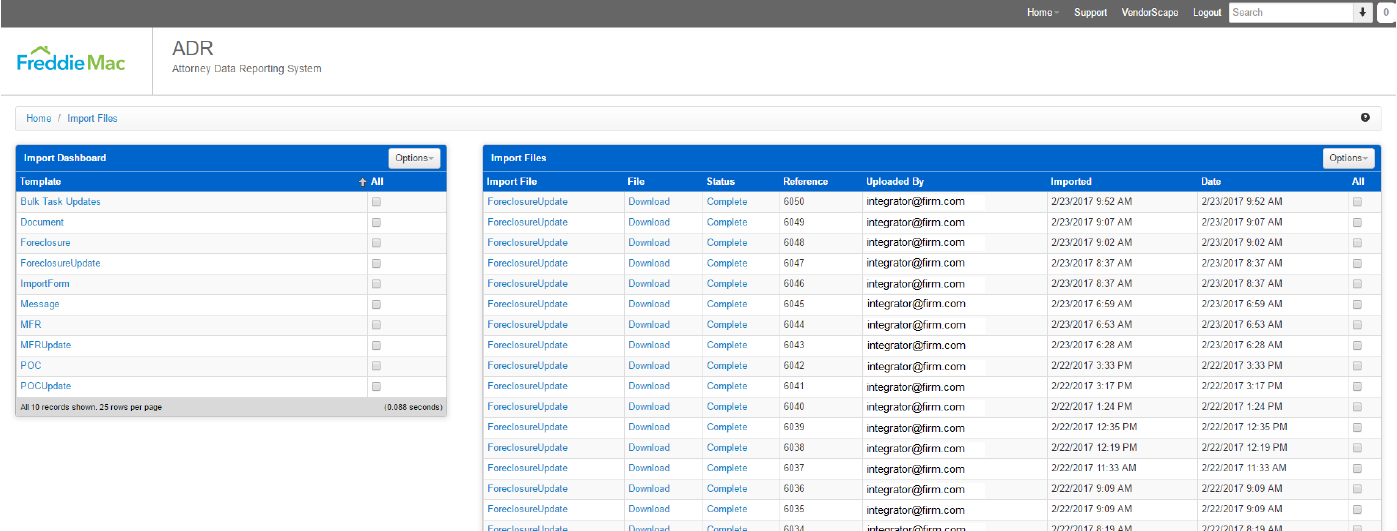
Sort any column by clicking its header. The Options menu filters the list:
| Filter | Shows |
|---|---|
| Active | Imports submitted in the last 7 days |
| Success | Imports with no errors (clear Error when you choose it) |
| Error | Imports with at least one error (clear Success when you choose it) |
| Complete | Completed imports (for asynchronous imports) |
Find an import
Section titled “Find an import”The Search box at the top right accepts:
- an ImportFileID: the
IDattribute ofImportResults, or - an external reference: the
Referenceattribute you sent onImportCollection.
The arrow beside the box opens Search Imports for more filters:
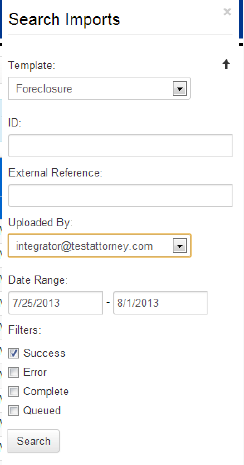
| Filter | Meaning |
|---|---|
| Template | The import template (operation) |
| ID | The ImportFileID |
| External Reference | The Reference attribute you sent on ImportCollection |
| Uploaded By | The account that submitted the import |
| Date Range | From and to dates. Set the to date one day past the last day you want. |
| Success, Error | As in the Options filters |
| Complete, Queued | Completed or still-queued imports (for asynchronous imports) |
Import details
Section titled “Import details”Each row in the results links to:
- Import File: the import file summary.
- Download: the XML you submitted.
- Status: summary counts and a download of the import result XML, in the same format the API returned.
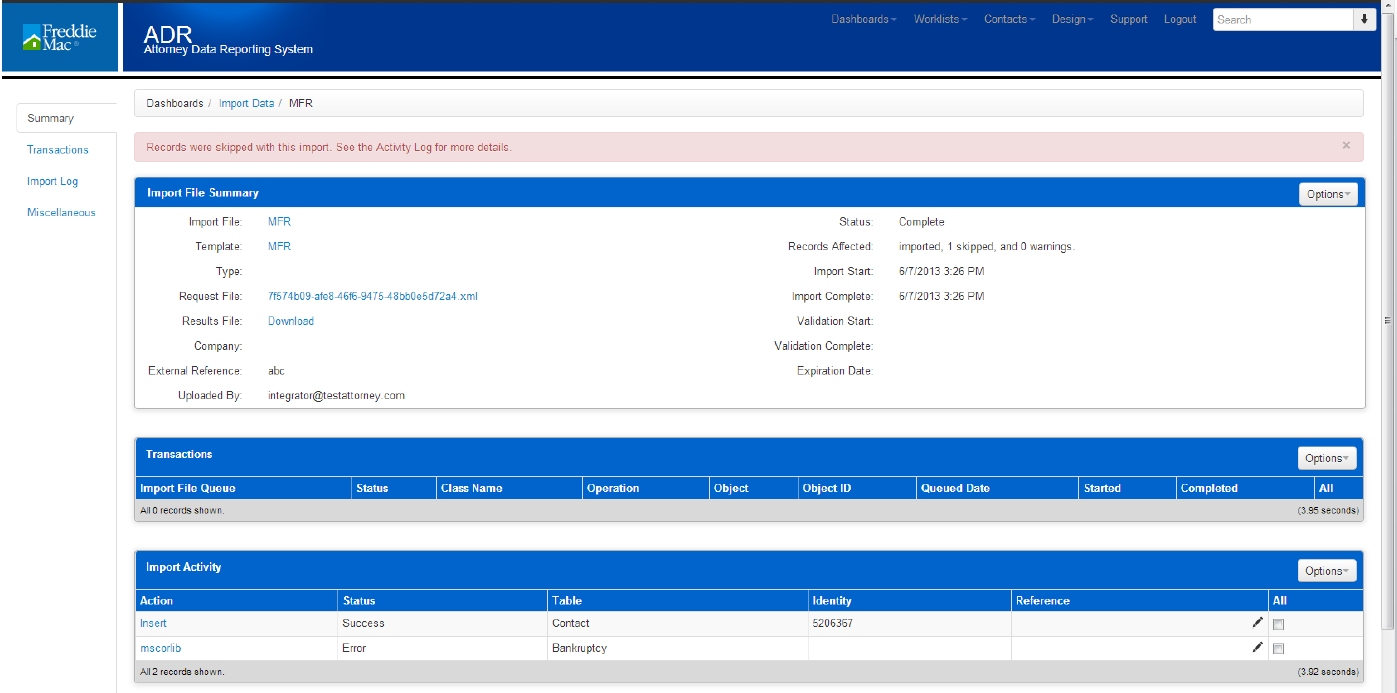
The import file summary has three parts:
- Summary: the import’s details, statistics, and downloads of the request and result.
- Transactions: not used by ADR.
- Import Activity: one row per record, with its status (Success or Error), the ADR table, the ID of the affected record, and your reference. The reference links to the raw XML or the error detail.
Certification checklist
Section titled “Certification checklist”Before you can send data to production, you complete ADR certification in UAT: you show you can run each operation in realistic scenarios. Use this checklist to prepare. Record the loan number you used for each item and whether it passed.
| Case type | Steps |
|---|---|
| Foreclosure | New referral · Update the Foreclosure · Complete an ImportForm · Post a message · Upload a document · Complete all ImportForms for the state · Add a delay · Complete the delay · Update the ledger · Close the file |
| POC | New referral · Update the POC · Post a message · Upload a document · Complete an ImportForm · Add a delay · Complete the delay · Complete the remaining ImportForms · Update the ledger · Close the file |
| MFR | New referral · Update the MFR · Upload a document · Complete an ImportForm · Add a delay · Complete the delay · Post a message · Complete the remaining ImportForms · Update the ledger · Close the file |
Do I need to send property and loan details with a referral? No. Only the Freddie Mac loan number is needed to find the loan: Freddie Mac boards property and loan data into ADR daily. The referral binds to the loan by that number, so make sure it’s correct. (Some loan fields are still required by the Foreclosure schema; see Foreclosure.)
DCS referrals needed an AttorneySubscriberID. Does ADR? No. ADR assigns your firm to the case from the credentials on the request.
Can I update cases that were open in DCS? Yes. Open DCS cases were converted into ADR along with their SubscriberIDs, so send updates with the same SubscriberIDs as before.
Does ADR accept Eviction or Closing referrals? No. Freddie Mac doesn’t track them in ADR.
How do I update steps? With ImportForms, either nested in a process update or with the stand-alone ImportForm operation. ImportForms replaced DCS milestones.
Troubleshooting errors
Section titled “Troubleshooting errors”| Error | Cause and fix |
|---|---|
| You don’t have permissions to the ‘LoanInsert’ function. | The Freddie Mac loan number in Loan/Loan isn’t in ADR. You can only add cases to loans already in ADR. |
| Rule Exception: Foreclosure cannot be inserted without Assigned Organization | One of: (1) your integration account isn’t associated with any organization; (2) the property’s state isn’t in your firm’s jurisdictions. If your account belongs to several organizations, ADR may have tried the wrong one, and resubmitting usually binds the right one; (3) you’re updating with a SubscriberID ADR doesn’t have yet, but the Foreclosure already exists. This usually happens with operations other than Foreclosure, often after a firm adds states to its jurisdictions. Contact adr.support@quandis.com to confirm and to backfill SubscriberIDs for those jurisdictions. |
| Rule Exception: There is currently an active Foreclosure for this Loan and your account is not configured to add one | ADR allows one active Foreclosure per loan, and one already exists (at your firm or another). It must be closed before a new one is added. If it’s your firm’s case, check that your SubscriberID hasn’t changed between submissions. |
| Rule Exception: A (foreclosure/bankruptcy) process cannot be opened on a loan that is archived, closed or in REO. | New cases can’t be added to loans that have left Freddie Mac’s portfolio or are in REO. Existing cases can still be updated with ForeclosureUpdate, MFRUpdate, POCUpdate, ImportForm, Message and Document. If you think the error is wrong, contact Freddie Mac. |
| Rule Exception: Start Date must be specified when creating a case | A new case needs DateOpened. ForeclosureUpdate doesn’t require it in the schema, but tries to create the case if it doesn’t exist. Use the Foreclosure operation and include DateOpened. |
| Rule Exception: Task Completion dates cannot be changed once already set | The step was already completed with a different date. Completion dates can’t be changed. |
| Rule Exception: Tasks cannot be completed using a date prior to the previous task’s completion date | Steps complete in order. The completion date is earlier than the previous step’s. |
| Rule Exception: Case status cannot be updated once the case is already closed | The SubscriberID belongs to a closed case. Use a new SubscriberID for the new case. If you can’t generate one, contact adr.support@quandis.com to change the existing case’s SubscriberID. |
| Rule Exception: In order to close a case, the Status must be ‘Closed’ AND a Removal Date must be entered | Closing an MFR or POC needs both: you sent Status of Closed without DateClosed (the Removal Date), or sent DateClosed with no Status or a status other than Closed. |
| Rule Exception: Opening Bid Amount must be set when completing task | Foreclosure Sale Held needs Foreclosure_BidAtSale_BidOpening. |
| Rule Exception: Credit Bid Amount must be set when completing task | Foreclosure Sale Held needs Foreclosure_BidAtSale_BidMax. |
| Rule Exception: Credit Bid Due must be set when completing task | Foreclosure Sale Held needs Foreclosure_BidAtSale_BidDue. |
| HTTP 401 | Wrong credentials, or credentials for a different environment. Also check the User-Agent / SOAPAction rule. |
| Unrecognized Template | The operation in the URL isn’t an ADR import template. Check it against Operations. |
Revision history
Section titled “Revision history”| Version | Date | Changes |
|---|---|---|
| 1.31 | 2025-01-28 | Added the bid-information errors to Troubleshooting. Changed required fields to conditional where appropriate. |
| 1.30 | 2023-01-13 | Removed the Restart operation, which is no longer available. |
| 1.29 | 2022-09-06 | Added ConvertedDate, DischargedDate and DismissedDate. |
| 1.28 | 2022-06-29 | Added the HAF delay template. |
| 1.27 | 2022-06-21 | Troubleshooting addition. |
| 1.26 | 2020-02-22 | Added the Total Debt ledger posted date to ImportForm. |
| 1.25 | 2020-01-14 | Removed Autobind from stand-alone operations (not supported). |
| 1.24 | 2019-10-18 | Added Autobind; conditional requirements updated across operations. |
| 1.22–1.23 | 2018 | Added elements for ordering title; ProcessType in the Foreclosure sample. |
| 1.19–1.21 | 2017 | Delay template refresh; ImportForm message requirement; case closure requirements and closed-reason lists; workflow steps moved to the Attorney User Guide; Foreclosure and ForeclosureUpdate aligned. |
| 1.0–1.18 | 2013–2015 | Initial release and state workflow updates. |