
Organize a policy's claims, renewals, and onboarding as processes
Verified against source (10)
mortgage/InsurancePolicy.csmortgage/InsurancePolicy.Fields.csConfig/InsurancePolicy.configMortgage/InsurancePolicy.Edit.xsltprocess/Process.csprocess/ProcessTemplate.csprocess/ProcessTemplate.Fields.csprocess/Enumerations.csProperties/Settings.settingsProcess/ProcessTemplate.Edit.xslt
An insurance policy collects years of activity: underwriting at onboarding, a claim for hail damage, another for a burst pipe, an annual review every renewal. Put all of it in one record and the documents, tasks, and notes soon become impossible to navigate, the electronic version of a binder stuffed with loose paper.
In this walkthrough you give each piece of work its own process, the equivalent of a labeled manila folder inside the policy’s binder. Each process has its own open and close dates, status, tasks, documents, messages, and workflow:
| Process | Opened | Closed | Status |
|---|---|---|---|
| Policy Onboarding | Feb 1 | Feb 15 | Approved |
| Insurance Claim: Fire Damage | May 1 | Jun 15 | Paid |
| Insurance Claim: Mold | Aug 1 | Aug 3 | Rejected |
| Annual Review | Feb 15 (next year) | Feb 16 | Renewed |
You’ll build three process templates (Policy Onboarding, Insurance Claim, and Annual Review), set their close rules, and use a rules matrix so each new claim starts the workflow that fits its state and coverage amount.
Who it’s for
Section titled “Who it’s for”Power users who maintain templates for an insurance operation: claims, underwriting, or policy servicing.
Prerequisites
Section titled “Prerequisites”- Permission to create and edit process templates, workflow templates, and rules matrices.
- The workflow templates you want processes to start (this walkthrough uses Customer Outreach, Metro NY Outreach, and High Value Outreach). See Workflow to build them.
- A place to keep policies. QBO’s insurance policy record works well (see step 1); any record type can be the parent of a process.
Building blocks used
Section titled “Building blocks used”- Cases: process templates, close rules, and assignment
- Workflow: the work each process starts
- Business Rules: the matrix that picks a workflow
- Templates: custom statuses, types, and reasons
- Contacts: insurers and insureds
1. Decide what a policy is
Section titled “1. Decide what a policy is”QBO’s insurance policy record is itself a kind of process, so it gets everything a process has (status, assignment, workflow, documents, tasks) plus policy fields:
| Field | Holds |
|---|---|
| Insurance Policy | The policy number or label (required) |
| Status, Type | From the policy’s template, or the standard lists |
| Effective Date, Expiration Date | The policy term |
| Insurer | The carrier, chosen from the organizations in a collection named InsurancePolicy Insurer Organizations |
| Insured | The insured contact |
| Premium, Coverage, Deductible, Replacement Cost | Money amounts |
| Escrow | Yes or No |
| Flood Zone | Text |
Any other value you save with a policy, such as a field added on the edit form with New Parameter or a column in an import, is kept with the policy rather than discarded. A policy can also point to a parent policy, for endorsements or renewals that replace an earlier policy.
To use it, create the collection InsurancePolicy Insurer Organizations and add your carriers, so the Insurer list is populated.
2. Create the process templates
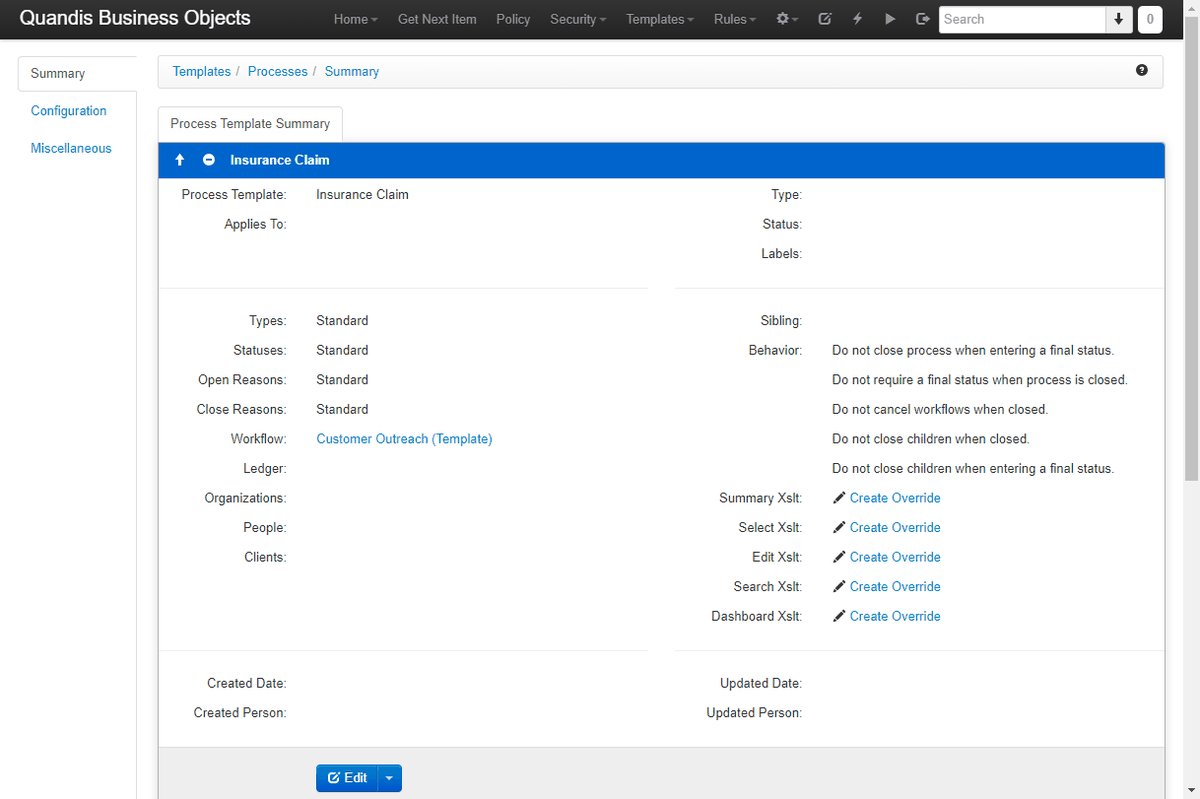
Section titled “2. Create the process templates”Go to Templates > Processes and create a template for each kind of work:
| Setting | Policy Onboarding | Insurance Claim | Annual Review |
|---|---|---|---|
| Process Template | Policy Onboarding | Insurance Claim | Annual Review |
| Applies To | InsurancePolicy |
InsurancePolicy |
InsurancePolicy |
| Workflow | Template: your onboarding workflow | Matrix (step 4) | Template: your renewal workflow |
Applies To makes these processes children of a policy, so each one opens from the policy and appears in its list of processes. Every process template allows many processes per parent record, which is what you want for claims and renewals.
3. Give each template its own vocabulary
Section titled “3. Give each template its own vocabulary”A claim ends Paid or Rejected; an annual review ends Renewed or Non-renewed. Set Statuses to Custom on each template and define the list on the template’s Custom Statuses tab. Do the same for Types (Fire, Water, Hail, Liability), Open Reasons, and Close Reasons as needed. Mark the statuses that end the work as final; the close rules in step 5 depend on it.
4. Let a matrix choose the claim workflow
Section titled “4. Let a matrix choose the claim workflow”Claims in some regions and claims above a coverage threshold need different outreach. Rather than creating a template for each, set the Insurance Claim template’s Workflow to Matrix and open the Workflow Matrix tab:
- Add an input State, value type List, weight 10.
- Add an input Coverage Amount, value type Money range, weight 5.
- Set each input’s XPath to where that value lives in the claim’s data.
- Add an output named
DecisionTemplate. Its value is the name of the workflow template to start. - Add one row per rule:
| State | Coverage Amount | DecisionTemplate |
|---|---|---|
| NY, NJ | Metro NY Outreach | |
| 1,000,000 – 5,000,000 | High Value Outreach | |
| Customer Outreach |
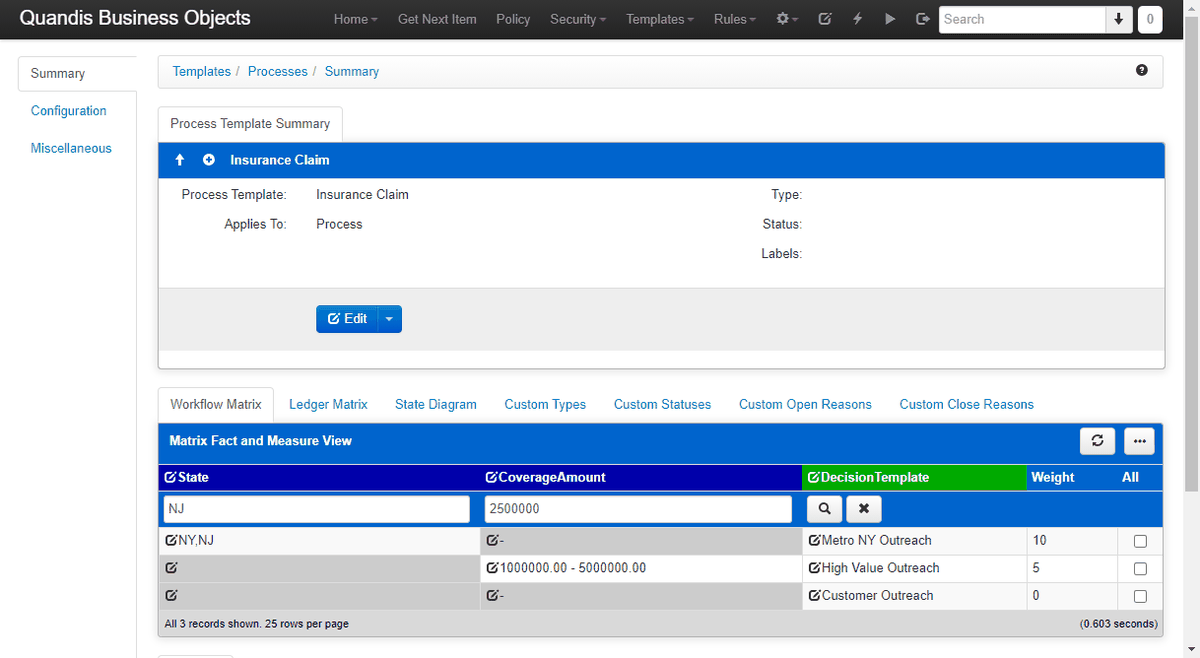
A blank cell matches anything, and the eligible row with the highest total weight wins:
- NJ, $2.5 million: all three rows are eligible. State (10) outweighs Coverage Amount (5), so Metro NY Outreach starts.
- CA, $2.5 million: the coverage row wins, so High Value Outreach starts.
- CA, $400,000: only the blank row matches, so Customer Outreach starts.
Type test values into the input boxes above the rows to see which row wins before any claim depends on it. If the matrix returns nothing and the template also names a fixed workflow, the fixed workflow starts.
5. Set the close rules
Section titled “5. Set the close rules”Under Behavior on each template:
| Setting | Recommended for claims |
|---|---|
| Close process when entering a final status | Yes, so Paid or Rejected closes the claim |
| Require a final status when process is closed | Yes, so no claim closes without an outcome |
| Cancel workflows when closed | All, so outreach stops on closed claims |
| Close children when closed | Yes, to clear open worklist items |
| Close children when entering a final status | Yes |
6. Decide who can work the processes (optional)
Section titled “6. Decide who can work the processes (optional)”Organizations, People, and Clients each take a collection that limits who a process can be assigned to. Assigning a process to an outside organization, such as an independent adjuster firm, gives that organization access to that process and nothing else.
7. Customize the screens (optional)
Section titled “7. Customize the screens (optional)”The template’s Summary, Select, Edit, Search, and Dashboard Xslt settings each offer Create Override, which replaces the standard screen for processes of this template. Use it when claims need a different layout from reviews, for example to show the loss date and adjuster at the top.
8. Open a claim
Section titled “8. Open a claim”Create a process on a policy with the Insurance Claim template, whether by hand, through an import, or from another workflow’s Open a Process step. QBO opens the claim, evaluates the matrix, starts the chosen workflow as of the claim’s open date, and records it as the claim’s current workflow.
The result
Section titled “The result”Each policy now has a tidy set of folders. Every claim, review, and onboarding has its own tasks, documents, messages, and workflow, with an outcome-specific status and an open and close date. New claims start the right outreach without anyone choosing it, and closing a claim stops its work.
Next steps
Section titled “Next steps”- Generate a claim document from a Word template using data from the claim and the policy.
- Automate force-placed insurance notices and discrepancy review with imports, timed workflows, and a worklist.
- See how insurance teams use these building blocks on QBO for insurance.